

Learning how to accept crypto payments on your website involves two jobs. The first is visible: giving customers a way to pay through a hosted checkout, a payment link or QR code, an ecommerce plugin or a direct API integration. The second matters more. Your website has to know when a payment is actually confirmed, what to do when a customer sends too little or uses the wrong network, and how refunds will work. This guide covers both, for merchants and developers who have already decided to offer crypto and now need to switch it on.
What accepting crypto payments on a website involves in 2026
Accepting crypto payments on a website means connecting your checkout to a provider. For each order, the provider issues payment details, watches the blockchain for the customer’s transaction and tells your system once the payment is confirmed. You need an approved account first. Fulfil orders only after confirmation arrives, not when the customer clicks Pay.
The sequence is broadly the same whichever route you choose:
- Your merchant account is approved.
- You choose an integration route.
- A payment is created for a specific order and amount.
- The customer chooses a supported asset and sees the network to use.
- The customer sends the payment from their own wallet.
- The network confirms the transaction.
- The provider updates the order and notifies your system.
- You fulfil the order once the payment is confirmed.
A payment button covers steps two and three. Most operational work sits in steps four to eight.
Before you integrate: account, verification and what gets reviewed
Before any integration work, you need an approved merchant account. Crypto payment providers review businesses much as card providers do: who owns and runs the company, what it sells, where it operates and whether that activity is permitted in the relevant jurisdictions. Live credentials normally follow approval, not the other way round.
A typical review covers:
- KYB: company registration, directors and beneficial owners.
- Business model and website: what you sell, to whom, and your terms and refund policy.
- Jurisdictions: where you are established and which markets you serve.
- Compliance: crypto payment providers may apply AML and compliance checks depending on the business, jurisdiction and payment setup.
Some sectors face extra questions, as our guide to crypto payments for peptide businesses shows. With Niftipay, crypto payments are available in supported jurisdictions, subject to KYB and compliance review.
Four ways to add crypto payments to a website
There are four practical routes: a hosted checkout, a payment link or QR code, an ecommerce plugin, or a direct API integration. They differ in how much you build and how much of the checkout you control. All four need the same foundations: an approved account and a reliable way to confirm that each payment has arrived.
If you are still choosing a provider, start with our guide to choosing a crypto payment processor. This article assumes that decision has been made.
| Integration route | Development effort | Checkout control | Best fit |
|---|---|---|---|
| Hosted checkout | Low | Lower | Merchants wanting a provider-hosted flow |
| Payment link / QR | Very low | Low | Invoices, manual sales, social and email orders |
| Ecommerce plugin | Low–medium | Medium | WooCommerce and PrestaShop stores |
| Direct API | Higher | High | Custom platforms and developer-led integrations |
Hosted checkout
With a hosted checkout, the customer moves from your website into a payment flow run by the provider, which shows the amount, network, wallet address and QR code and tracks the payment. You don’t build a crypto payment interface, but your website still needs to receive the payment status (see the webhooks section below).
Payment links and QR codes
A payment link is a payable order created without a shopping cart. You set the amount and share the link, and the customer opens it to see the payment instructions and QR code. Links suit invoices and sales agreed by email, chat or social media. They don’t replace order tracking: map each link to an order reference and confirm the payment before you deliver.
WooCommerce and PrestaShop plugins
To accept crypto on WooCommerce or PrestaShop, you need an approved payment account, the provider’s plugin, your account credentials and a tested payment-confirmation flow. The plugin adds crypto as a checkout option. When a customer selects it, they see the amount, network, address and QR code for their order.
Niftipay has plugins for WooCommerce and PrestaShop. There is no Shopify or Magento plugin. Those stores, and custom platforms, can use a hosted checkout, payment links or the API instead.
A typical plugin set-up:
- Have your merchant account approved and crypto payments enabled.
- Install the plugin for your platform.
- Connect your API credentials and the store’s integration settings.
- Enable the crypto payment method and the supported assets you want to show, including USDT or USDC if required.
- Place a test order and check that confirmation updates the order.
- Confirm webhook and status handling before going live.
If you run several shops, give each its own integration and webhook. Requirements change, so check the current WooCommerce or PrestaShop plugin guide rather than a copied list. For platform questions to settle before you apply, see our guide to payment gateways for WordPress, Magento and PrestaShop.
Direct API integration
A direct API integration suits a custom checkout, your own order lifecycle or a backend that talks to the provider directly. It gives the most control and needs the most development and maintenance. A sound integration includes:
- A unique reference per order, so a retried request can’t create a duplicate payment.
- Payment creation from your backend, returning the asset, network, amount, address and QR data.
- A return flow that shows the customer the real payment state.
- Webhooks for status changes, with a status lookup as a fallback.
Choosing which coins and stablecoins to accept
Choose assets based on what your customers already hold and what your operations can handle, not on the length of a provider’s list. “Do you support USDT?” is not enough. For every asset, confirm the exact network, how network fees are shown to the customer, and how your team will reconcile and refund payments in it.
Bitcoin and other native coins
Native assets such as BTC, ETH, SOL, LTC and XRP can be simpler to identify because the asset and its native network are usually tied together, although merchants should still show the required network clearly at checkout. Prices are usually shown in your normal currency and calculated in the asset at checkout. A coin’s value can change while you hold it, so plan reporting and treasury accordingly.
USDT and USDC: why the network matters
USDT and USDC exist on several blockchains, and the same ticker on two networks is not interchangeable. A payment sent on a network the merchant doesn’t support won’t arrive as expected. Before offering stablecoins, confirm the exact supported network and make it unmistakable at checkout.
Tether lists the protocols on which USDT is issued, and Circle publishes USDC contract addresses per chain.
With Niftipay, USDT and USDC acceptance is currently on Ethereum (ERC-20) only. Each checkout shows one asset and one required network, and the customer must send on that network. Ethereum network fees can weigh on small payments, so test the experience at your typical order value. If you are still evaluating stablecoin providers, see our guide to stablecoin payment processors.
How a crypto payment moves from checkout to confirmation
A crypto payment is confirmed by the blockchain and the provider, not by the customer’s browser. Your website creates the order. The provider issues payment details. The customer sends funds, and the provider detects and confirms the transaction before updating the order. Only that confirmed state should trigger fulfilment.
- Your website creates the order and requests a payment.
- The provider returns payment details: asset, network, amount, address and QR code.
- The customer sends the supported asset on the stated network.
- The blockchain records the transaction, and the provider detects it.
- Network confirmations accumulate. Timing depends on the network.
- The provider updates the payment state and notifies your system.
- You fulfil the order once the payment shows as confirmed.
A return to your thank-you page is not proof of payment. With Niftipay, a payment is credited once the network has detected and confirmed it; balance availability is typically around 10 minutes after confirmation, but timings vary by network.
Order statuses and webhooks: knowing when an order is actually paid
A crypto checkout should not mark an order as paid just because the customer returned to the website. Confirmation can arrive after the browser session has ended. Your system should rely on a server-to-server notification from the provider, usually a webhook, and verify it before changing the order.
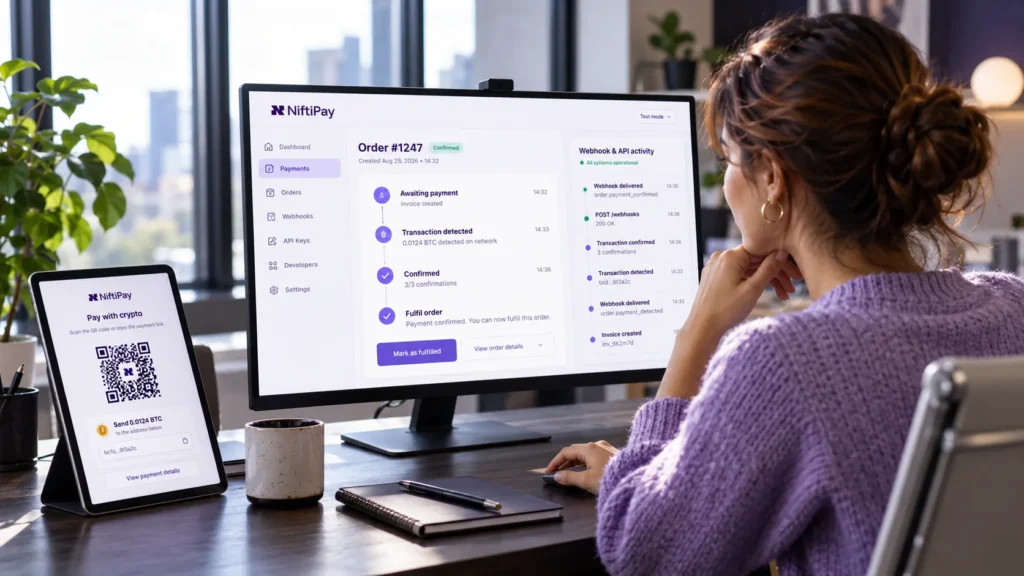
Providers name their states differently, but the concepts are consistent: awaiting payment, underpaid, paid and confirmed, expired, cancelled and refunded.
Handle webhooks as carefully as any payment notification:
- Verify the signature on your backend. Niftipay signs webhooks with an HMAC signature; check it with your webhook secret and reject anything that fails.
- Process events idempotently. An event can arrive more than once, and an order can receive several underpaid updates.
- Never downgrade a paid order because a late cancellation or expiry arrives out of order.
- Store the order reference and transaction hash against each order.
- Keep a fallback: payment status is also available in the dashboard and through the API.
For more on event handling, see our guide to payment gateway webhooks.
Handling exceptions: underpayments, overpayments, wrong networks and expired invoices
Crypto payments don’t always arrive exactly as requested. A customer can send too little or too much, use the wrong network, or pay after the invoice expires. Decide in advance what your team does in each case, and don’t fulfil an order until the payment state supports it.
| Situation | What it means | What the merchant should do |
|---|---|---|
| Underpaid | Customer sent less than required | Don’t fulfil automatically. Request the balance, cancel or take another appropriate step |
| Overpaid | Customer sent more than required | Review the case. With Niftipay, the extra amount stays in the merchant balance and is not returned automatically, so any adjustment is a manual decision |
| Wrong network or asset | Funds sent on an unsupported network or in the wrong asset | Don’t promise recovery: these funds may be unrecoverable. Refer the customer to support |
| Expired payment | Payment not completed in the valid window | Create a new payment for the order where appropriate |
| Awaiting confirmation | Payment not yet confirmed by the network or provider | Don’t fulfil yet |
Niftipay identifies these cases and reviews them individually rather than resolving them automatically. Prevention is cheaper than repair: show one asset and one required network per checkout.
Crypto refunds work differently from card refunds
A crypto refund is not a reversal of the original payment. It is a new on-chain transaction to a wallet address the customer provides. Crypto payments don’t follow the card-network refund and chargeback process, so you need a refund policy that covers the address, the asset and network fees.
Collect a valid refund address, confirm the asset and network, expect network fees to affect the amount received, and record the refund against the original order. With Niftipay, refunds are sent to the validated wallet address supplied for the refund process. For detail, see our guide to crypto payment refunds.
Accounting, tax and compliance questions to settle first
Before going live, agree how crypto payments will be recorded, valued and reported. You need a record of each payment, its value in your reporting currency at the time it was received, and any refunds. Tax treatment depends on your jurisdiction. This is operational guidance, not tax or legal advice.
Settle these with your finance team and advisers:
- Records: order reference, asset, network, amount, transaction hash and value in your reporting currency for each payment.
- Refunds: how refunds and their network fees are booked.
- Tax: how your jurisdiction treats receiving and holding cryptoassets. In the UK, HMRC’s Cryptoassets Manual is the reference point.
- Markets: which customer markets you serve and whether local rules apply there.
Go-live checklist for crypto payments
Go live only once you have tested the full payment lifecycle, not just the checkout button: a confirmed test payment, verified webhooks, a tested underpayment or expiry case, a documented refund process, and a support team ready for wrong-network questions.
- Merchant account approved and crypto payments enabled
- Supported jurisdictions and markets confirmed
- Integration route chosen
- Supported assets and networks confirmed and shown clearly at checkout
- Test payment completed end to end
- Webhook signature verification tested
- Fulfilment triggered only by a confirmed payment
- Underpayment and expiry handling tested
- Refund process documented, including how refund addresses are collected
- Customer support briefed on wrong-network questions
- Accounting and reconciliation process ready
How Niftipay supports crypto and stablecoin acceptance on websites
Niftipay lets eligible merchants accept cryptocurrency and stablecoin payments through a hosted checkout, payment links and QR codes, WooCommerce and PrestaShop plugins, or the REST API with webhooks. Availability is limited to supported jurisdictions and subject to KYB and compliance review.
- Assets: BTC, ETH, SOL, LTC, XRP, USDT and USDC, according to the payment flow approved for your account.
- Stablecoin network: USDT and USDC acceptance currently uses Ethereum (ERC-20).
- What you receive: the same crypto asset the customer paid, credited to your Niftipay balance. Niftipay does not automatically convert crypto payments into fiat.
- Tracking: status in the dashboard and through the API, with webhooks pushing changes to your system.
See the Niftipay Crypto Payments page for the full product overview.
How to accept crypto payments: FAQs
Can I accept crypto payments without rebuilding my website?
Yes. A hosted checkout or payment links work alongside your existing site with little or no development, and WooCommerce and PrestaShop stores can add a plugin. A direct API integration is only needed for full checkout control.
Can WooCommerce or PrestaShop stores accept USDT and USDC?
Yes, where the merchant account and payment setup are approved and the customer pays on the supported network. With Niftipay, plugins are available for both platforms, and USDT and USDC acceptance currently uses Ethereum (ERC-20).
What happens if a customer pays on the wrong network?
Funds sent on an unsupported network or in the wrong asset may not arrive and may be unrecoverable, so recovery can’t be promised. Show one asset and one required network per checkout, and ask customers to contact support immediately if a mistake happens.
How does my website know a crypto payment is confirmed?
Through a server-side update from the provider, usually a signed webhook that your backend verifies before updating the order. A customer returning to your website is not proof of payment. Keep a status lookup as a fallback.
Do I receive crypto or fiat when a customer pays in crypto?
With Niftipay, you receive crypto: the same supported asset the customer paid. Niftipay does not automatically convert that payment into fiat. Some merchants offer USDT or USDC because these stablecoins are designed to track the US dollar.